Convert with a purpose
Choose everyday playback, professional editing presets, or a fast stream copy when the source tracks are compatible.
MEET YOUR NEXT VIDEO WORKFLOW
From a camera clip to a share-ready file. Convert, compress and prepare your videos on your Mac—with your files staying right where they belong.
Intel + Apple Silicon · macOS 12+
KROMA / WEB TOOLS
Practical PDF tools and a multilingual keyboard, right in your browser.
MP4 / MOV / MKV / WEBM
Get your footage ready for the next step, whether you’re sharing, editing or saving space.
H.264 video and AAC audio for everyday playback.
A format illustration—not a browser converter.
MADE FOR THE WORK BETWEEN SHOOTING AND SHARING
Choose everyday playback, professional editing presets, or a fast stream copy when the source tracks are compatible.
Compress, resize, trim and rotate. Extract an audio track or export a still frame without adding another tool to your workflow.
Import multiple clips, choose an output folder and track each conversion in a queue. Pause new jobs or cancel an active one.
A FAMILIAR WORKSPACE
Your files, settings and queue in one focused desktop interface. Choose a preset or fine-tune an export when the details matter.
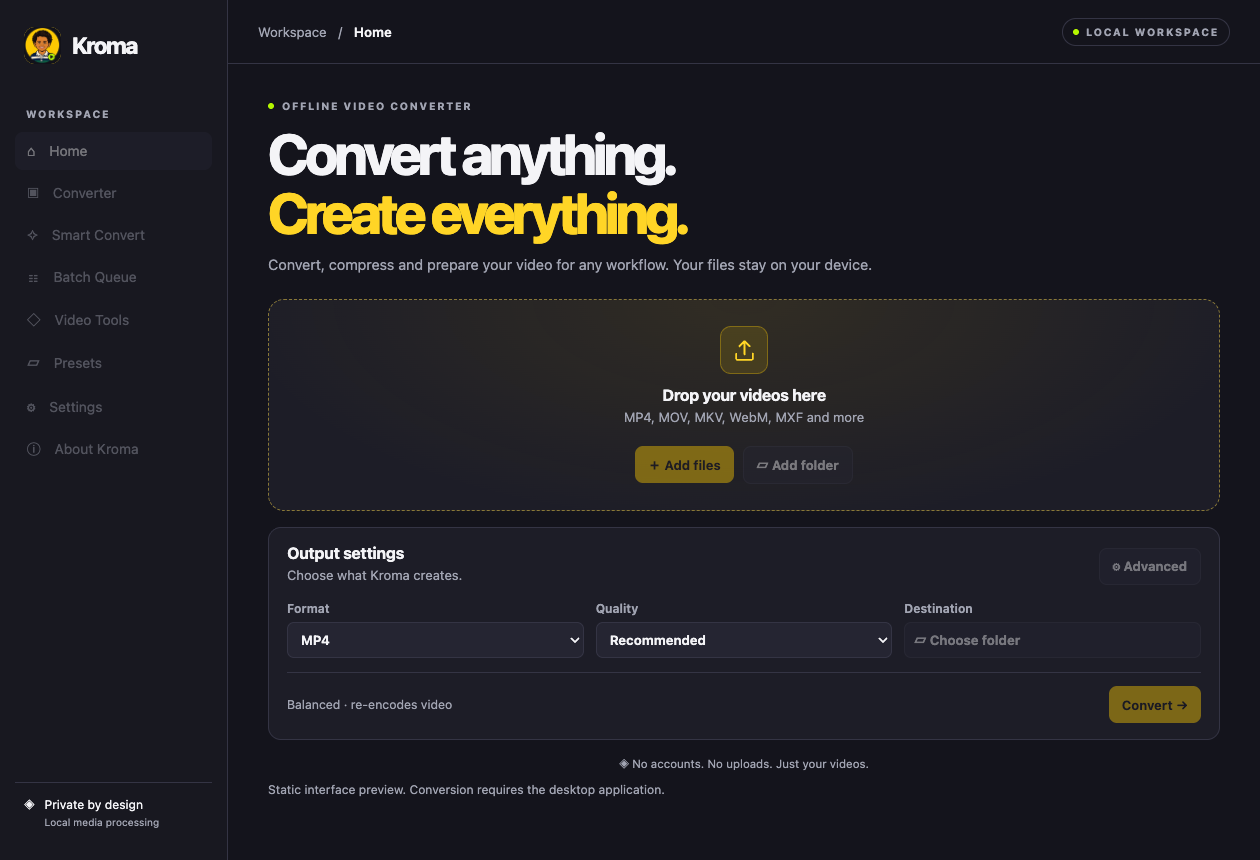
Interface preview · Desktop interface currently in English
FROM SOURCE TO FINISHED FILE
Add files or a folder to the desktop app.
Select a format, a preset and a destination.
Start your queue. Your originals stay untouched.
No. Video processing happens locally in the desktop app. The initial media-tool setup needs internet; your videos are not part of that download.
The universal app contains Intel and Apple Silicon versions and targets macOS 12 Monterey or later. Older macOS releases, iPhone and iPad are not supported. Compatibility on every Mac has not yet been verified.
This download is a test build. It is not Apple-notarized, and macOS may warn about or block it. Full desktop acceptance testing is still pending. Don’t disable macOS security protections to run it.
This website introduces Kroma and provides the Mac download. Import and conversion happen inside the desktop app.
This website is available in English, Arabic, French and Spanish. The current desktop interface is in English.
YOUR NEXT EXPORT STARTS HERE
Get the universal Mac test build and try a local video workflow.

Intel + Apple Silicon · macOS 12+
About 12 MB · Version 0.1.0
Open the DMG and drag Kroma into Applications. On first launch, download the media tools (about 55–65 MB). Processing works offline after setup.
Test build · Not notarized by Apple. macOS may warn about or block opening it.
730010f4e92a677e5b9ac2820dd4c2e6f4405df0f793113959ee750f84c89133